How to Write a Professional Email in English (with Templates)
Email is still the main way people communicate at work, at university and with clients. A clear, polite email in English can help you get a job, solve a problem quickly or build a good relationship with your manager. A confusing one can create misunderstandings and make you look less professional, even if your idea is excellent.
The good news is that professional emails follow a simple, repeatable pattern. In this guide, you will learn the 6-part structure of a professional email, useful phrases for each part, ready-to-use templates, and the mistakes many learners around the world make.
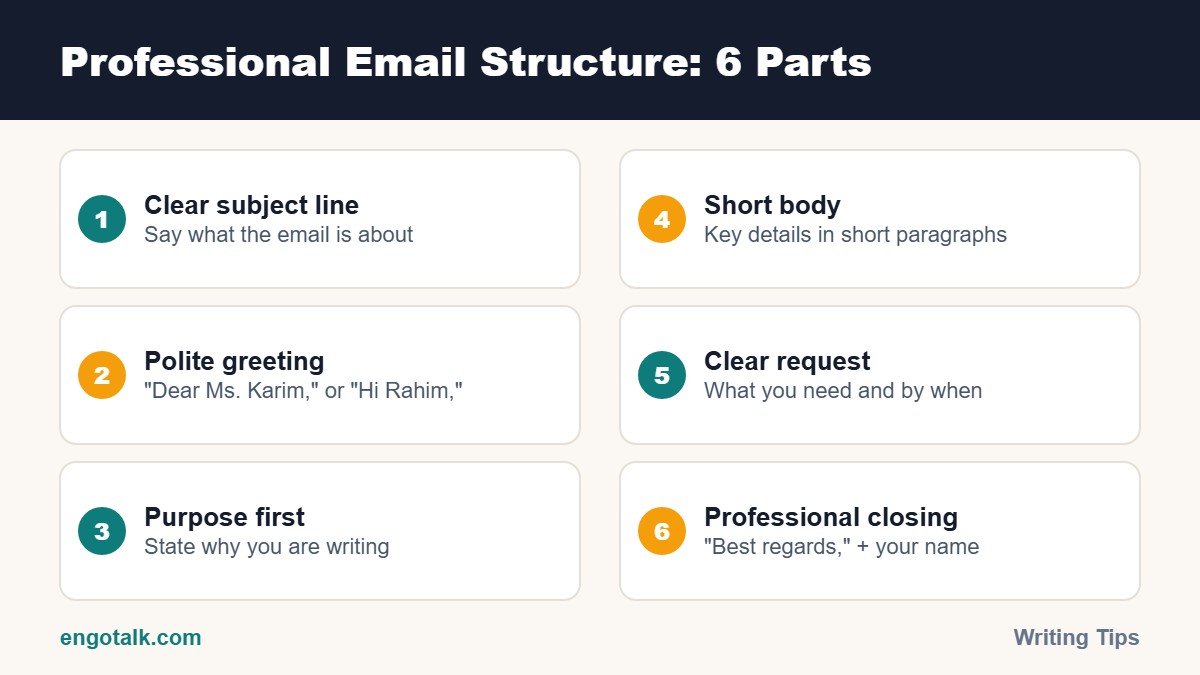
The 6 Parts of a Professional Email
1. Subject line
The subject line tells the reader what the email is about before they open it. Keep it short and specific.
Weak: "Request"
Better: "Leave request for 12–14 November"
Better: "Question about Invoice #2045"
2. Greeting
Use the person's name whenever you know it.
Formal: "Dear Mr. Patel," / "Dear Ms. Garcia,"
Neutral: "Hello Priya,"
Name unknown: "Dear Hiring Manager," or "Dear Customer Support Team,"
Avoid "Dear Sir" if you are not sure who will read the email. It sounds outdated to many modern readers.
3. Opening line and purpose
Get to the point in the first one or two sentences. Busy readers want to know why you are writing.
"I am writing to ask about..."
"I'm writing to follow up on our meeting yesterday."
"Thank you for your quick reply."
4. Body
Give the important details in short paragraphs of two to four sentences. If you have several points, use a numbered list so the reader can answer each one.
5. Request or next step
Tell the reader exactly what you need and, if possible, by when.
"Could you please send the report by Thursday?"
"Please let me know if Tuesday at 3 pm works for you."
6. Closing and signature
Formal: "Kind regards," / "Best regards,"
Friendly but professional: "Thanks," / "Many thanks,"
Add your full name, job title and phone number below the closing.
Useful Phrases for Professional Emails
Asking politely: "Would it be possible to...?" / "I would appreciate it if you could..."
Attaching files: "Please find the report attached."
Following up: "I just wanted to follow up on my previous email."
Apologising: "I apologise for the delay in replying."
Ending: "Please let me know if you have any questions."
Professional Email Templates
Template 1: Asking for information
Subject: Question about the IELTS preparation course
Dear Ms. Taylor,
I am interested in your IELTS preparation course starting in December. Could you please tell me the class schedule and the total course fee?
Thank you for your help. I look forward to hearing from you.
Best regards,
Daniel Kim
Template 2: Requesting leave
Subject: Leave request for 12–14 November
Dear Mr. Patel,
I would like to request leave from 12 to 14 November to attend a family wedding in Lisbon. I will complete the monthly sales report before I leave, and Emma has agreed to handle urgent client calls.
Please let me know if this is possible.
Kind regards,
Sofia Martins
Template 3: Following up
Subject: Follow-up: Marketing Executive application
Dear Hiring Manager,
I applied for the Marketing Executive position on 5 October and wanted to follow up on my application. I am still very interested in the role and would be happy to share any further information.
Thank you for your time.
Best regards,
Omar Hassan
Template 4: Apologising for a mistake
Subject: Correction to yesterday's invoice
Dear Mr. Lee,
I apologise for the error in yesterday's invoice. The total should be USD 450, not USD 540. I have attached the corrected invoice.
Please let me know if you need anything else.
Best regards,
Lena Fischer
Common Email Mistakes to Avoid
Old-fashioned phrases: "I beg to inform you" or "Kindly do the needful" sound outdated. Use simple, direct English.
Writing everything in one paragraph: Long blocks of text are hard to read.
All capital letters: WRITING IN CAPITALS feels like shouting.
Too informal: Avoid "Hey bro", emojis and SMS spelling like "plz" or "u".
Forgetting the attachment: Attach the file before you write the email.
Not proofreading: Read your email once before sending. Our guide to common grammar mistakes English learners make can help.
Quick Checklist Before You Click Send
Is the subject line clear?
Did I use the right name and greeting?
Is my purpose clear in the first two sentences?
Did I clearly say what I need?
Did I attach the files?
Did I check grammar and spelling?
If you are applying for a job, you will also need a strong cover letter. Read our step-by-step guide on how to write a job application letter in English.
Build Workplace English Confidence on EngoTalk
Good emails often lead to meetings, calls and interviews, and that is where spoken English matters. On EngoTalk, you can practise workplace conversations with peer learners and tutors on live 1-on-1 video calls, right from your browser. Start practising today.
Frequently Asked Questions
How long should a professional email be?
Most professional emails should be 50–150 words. If you need more, use short paragraphs or a list.
Is "Dear Sir/Madam" still acceptable?
It is acceptable in very formal letters, but "Dear Hiring Manager" or the person's name is more modern and usually better.
Should I write "Thanks" or "Best regards"?
"Best regards" is safe for almost every situation. "Thanks" works well when you are asking for help or with colleagues you know.
How quickly should I reply to a work email?
Try to reply within 24 hours on working days. If you need more time, send a short reply saying when you will respond fully.
Test yourself: 5-question quiz
Check what you remember from this article. It takes about one minute, and you earn XP for completing it.